Entrepreneurs and professionals like you use Colorpeak's services to complete their online marketing game and expand their businesses. With modern web design, advertising and viral marketing, your story will carry on like never before.
It's a fact that visual content helps with engaging potential customers on social media, but did you also know that brands that use videos and other visual content can help with conversions? Whether you're just trying to get people to sign up for your newsletter, take a survey, or make a purchase, you're probably looking for sure-fire ways to build your conversion rate. Better visual content can do just that; here's how.
How Better Visual Content Can Help You With Conversions
First of all, your conversion rate isn't necessarily how many of your site visitors end up buying something. If you're trying to get people to your website, you could have any number of goals, like trying to convert a visitor into a lead (i.e. get them to request a free quote). Conversion rates are heavily tied to the effectiveness of your marketing; effective marketing can help convince a person that they need what you're selling.
Visual content can do that in a way that words often can't. Humans process visual images much faster than a block of words, so even though good copy is critical, you can get a lot more customers through visuals (which is one of the reasons you should spend some time creating a great logo with a free tool like Logo Creator). Couple that with more and more people spending more and more time watching videos online, and you can't afford not to create engaging content.
Convincing you to boost your conversion rate by incorporating visuals into your marketing is easy enough, but that leaves the question of how? Here are five quick tips on creating engaging visual content for online marketing.
5 Top Tips on How Better Visual Content Can Help You With Conversions
1. Choose a consistent colour palette - Your visuals should align with the colour you choose for your logo, to create a consistent message for customers. Pay attention to the colours you choose, because colours elicit different emotions for people.
2. Practice with design apps - You're probably not an expert on visual design, but luckily, there are free apps out there to help you. The only way you'll get better at using them is to practice and work with them on a regular basis. You also should have a basic idea of visual design, like the Rule of Thirds.
3. Stay on your brand message - Hopefully, your business is adopting a specific voice and tone, particularly in your marketing. You might adopt a more humorous voice or a serious, scholarly voice. The actual voice doesn't matter, but your visuals should capture that voice. You should also pay attention to keeping a consistent message to help your customers trust you.
4. Engage your customers - Creating engaging content that people want to interact with online can help build conversions for you as well. Humour is almost always a win, but it's also important to stay on the message (see number 3). You can achieve this by being creative, incorporating animations, using stunning imagery; anything to get people to share your content and spread your message.
5. Use videos - You've probably heard the statistics on videos on social media, but they keep getting more popular every year, and there's no reason to think that trend won't continue. A helpful video to help explain your product can help convince a potential customer that they want it, which will drive them to your site and turn them into a conversion. If they don't understand what you're selling, why would they buy it?
Conclusion
Putting together better visual content is easier said than done, but it's not impossible, and it can really pay dividends in converting clicks into action. Great visuals should be a cornerstone of your marketing strategy.
At Colorpeak, we understand the importance of identifying new and upcoming trends in our area of expertise, web design, which s why we review them every year. Heading into a very different 2021, we’ve decided to compile our list of the future trends you should be aware of to continue to innovate and expand your marketplace through your website.
2021 Website Design Trends by Colorpeak
Rather than focus on the comeback of Dark mode in website design, we’ll be looking at the more practical aspects for 2021 website design trends, based on the knowledge your website should be first and foremost, an effective lead generation tool. The visual aspect, whilst important for branding and recognition, is far more effective when driven by data and content creation based in UX design.
So why not check out our list of 2021 website design trends based on the newest design ideas and some of Colorpeak’s extensive experience-driven insights:
2021 Website Design Trends by Colorpeak
Effective, responsive design needs to be mobile-first oriented
Smartphones are designed to grab peoples attention, and your website should have the same approach to make it a successful lead generation tool. Both your existing and potential customers now expect to access information, products and services through their mobile as the first point of contact. If your website isn’t designed for this type of access, you’re missing out on potential business and invaluable data insights. Delivering your information to the market on a smartphone means the navigation should keep the customer engaged, images and text will need to be adjusted to fit this format, so the user doesn’t get lost in unnecessary information. The average human concentration span is now just 8 seconds compared to 12 seconds in the year 2000. It’s vital your website delivers your message clearly and concisely, to maximise the 8 seconds of engagement you have available to you.
Data driven content for 2021 website design trends
Data-driven content
Accessing your customer information is key to building a successful content-driven strategy and is at the forefront of 2021 website design trends. Neil Patel (SEO Professional) defines this data as:
“Factual information generated from experiments, surveys, or testing that is used as a basis for forming conclusions.”
This information builds customer profiles and establishes a digital relationship built on their personal preferences and interests. By making your website a place to come for industry expertise or guidance, through things like ebooks and how-to guides, your business becomes more than just its products or services. It can start to define you as an industry leader and reputable resource, building brand recognition and ensuring returning website traffic.
Especially after the recent pandemic, video content and interaction have become a mainstay of communication and engagement. Your website should recognise and deliver insightful and thoughtful video communication and content to capture valuable data and build customer relationships.
Simple navigation with calls to action
At Colorpeak, we understand there’s no need to reinvent the wheel. A simple, effective menu with contact or cart details should be available to click at any time. The buying process should be as straight forward as possible. If it appears to be too complicated, you’re likely to lose that business.
Navigation directly affects the interactions your website creates and delivers, organising your information into the most effective workflow process can maximise the potential of your website.
Each website will have its own set of objectives, and at Colorpeak we’re best placed to inform your design process and to deliver your unique data and communication objectives. Although this seems like this should be standard practice, many website designs miss this critical element, which is why it’s made our list of 2021 website design trends.
Mobile design oriented navigation
Next level Lead generation solutions (chatbots and AI)
Chatbots have come along way since their initial inception and can be a brilliant tool for gathering information and answering general queries. Their advancement has come from machine learning and the ability to ask questions in a more ‘human-like’ manner. Also, consumers have become more used to seeing and interacting with chatbots. If the information is delivered in the right way, more and more people will continue to utilise this type of feature. AI is moving forward and even has the ability to create advanced algorithms based on an initial set of code. More and more technology is removing the need for humans to carry out more mundane tasks such as gathering basic information. This may be a 2021 website design trend but it’s also a trend which is set to grow exponentially over the coming decades. At Colorpeak, we work with you to make sure your website has the most up to date features and capabilities. We have a proven record of our AI bot generating 6% leads within industry averaging around 1.7%. Get in touch if you want to find out how our AI technology can help your business grow.
E-commerce solutions do decrease cart abandon rate
Our insights drive many of our approaches to website design. One of our key findings is the ease of purchasing a product or service is crucial. We make sure that ‘add to basket’ buttons are accessible from every page. This saves time searching for a specific page of an item to make the purchase, you can add it to the cart from any category page which displays multiple items. This delivers a seamless and frictionless shopping experience, which decreases the chance of cart abandonment due to customer frustration. According to a recent survey, the rate of cart abandonment of online shoppers stands at 75% across all industries. This is truly an astounding statistic. E-commerce solutions should be factored into your website design to ensure your business isn’t one of the ones needlessly losing sales and customers.
2021 web design trends
Multi-language solutions
We’re increasingly operating within a global marketplace, so you need to capture and inform your customers no matter where in the world they might live. Translators can be an effective tool to reach someone in their language and increase your market share. The more languages you speak, the more people you reach, and your website is the best platform to generate leads and interest across the globe. As one of 2021 website design trends communication with the wider marketplace is an easy and straightforward way to ensure your reach goes further than you ever expected.
2021 Website Design Trends Conclusion
At Colorpeak, we work with you to deliver the most effective website for your organisation’s needs. We continue to be leaders in our field as we ensure we adapt, change and utilise technology that’s delivering new and exciting insights, information and most importantly, the growth of your business.
In this post, I’m going to explain how you can add some custom text below your items in any Collection Page specifically in Flex Theme by Out of the Sandbox. I will start with some explanation behind the idea, and I will talk you through simple principles to copy and amend existing collection Shopify template. Having said that, if you’re here looking for a step-by-step guide, simply jump to the end of this post.
Why should you include any text below Collection page?
As all SEO experts know, good content syndication is a key to promote your website on Google. This principle seems to be even more critical now after recent Google core algorithm update rolled out on May 4th, 2020 that caused quite a stir. Shopify has a high number of adjustments that allow you to optimise your content for better ranking results. And some themes like Flex enable you to design your store in no time with some additional customisations. However, there are still a few options that are essential to optimise your content that Flex is missing and one of them is the ability to add custom text underneath your items Collection.
There is, of course, an option to include all your SEO tailored content with H2, H3 etc. elements in a standard page description, but you will end up with a massive block of text at the top of the page. This is not very UX friendly as your visitor is on your page most likely to view your products and not necessarily read a 1000 words description of the Collection. This is why the idea is to keep the top description short and sweet and move all the content that Google bots are after, below the collection items feed.
Using a custom Theme template for Collection
Initially, I thought to hire somebody to code this option into Flex theme so it can be easily accessible from the Collections customisation page. After further thought, I realised that this custom code would somehow amend the collections input space (where you usually adjust your title, description and meta description). And then a custom code would have to be created to pull that information from the page and display it below items Collection feed. Although this is a more elegant solution, I have decided that since I only have several collection pages to update, a more straightforward solution can be put in place. And that’s where the idea to use Shopify theme templates came from.
Collection template structure
Every Collection in Flex Theme is put together from the following sections that you can adjust for your needs:
HOW TO ADD TEXT BELOW COLLECTION FEED IN SHOPIFY FLEX THEME?
The general idea is to use the main Collection template (collection.liquid) and duplicate it for every custom Collection in which we want to include the custom text. We will then insert a code that includes the custom text below Sidebar section. You can use basic HTML elements like H1-H6, paragraph, bold text for example, but if you want to include unsorted list you will have to create custom CSS styling as well. You can do that by creating custom.scss style sheet in the Assets folder or amending styles.scss.liquid file (remember though to back up it first before you make permanent changes). Once the custom collection template is created, you can simply go to your Product > Collections page and change the Theme template to your custom template. You then repeat that action for every Collection in which you want to include the custom text below collection feed.
HOW TO ADD ACCORDION BELOW COLLECTION FEED?
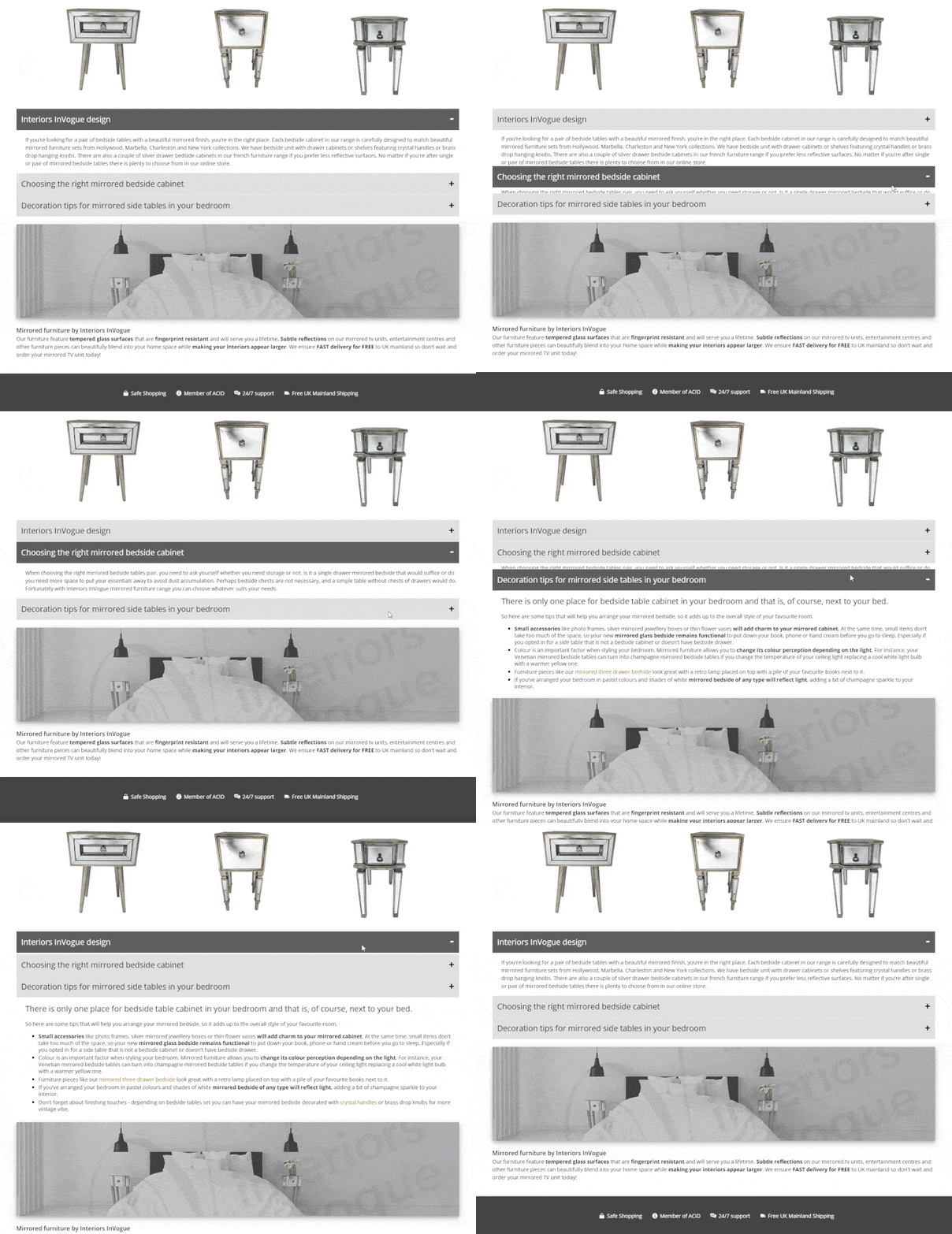
If your content is long adding text with simple styling might not be enough. In such a case, hiding paragraphs in toggles is a perfect solution. Fortunately, somebody smarter than me already came up with the ideas, so let me simply send you to this article by Leighton Taylor ‘How to add an FAQ accordion to your Shopify store‘. The tutorial includes a super easy 5 step guide, including a quick video and a demo of the solution that you will be implementing on your site. All you need to do is tweak CSS a bit for your needs and voila. And before you ask, the image was added with basic img tag.
By combining the three solutions with adding text, image and toggle below Shopify Collection feed in Flex Theme, here’s what I was able to achieve in one of our client’s stores.
Custom text in toggle with an image below
Step-by-step guide on how to add unique text below every Collection Page in Shopify Flex theme:
1. Log in to your shop and navigate to ‘Online Store’ in ‘SALES CHANNELS’ section listed on the right-hand side of the screen;
2. Hover over ‘Actions’ button (located in ‘LIVE THEME’ section) and select ‘Edit Code’ from the drop-down menu;
3. Locate ‘Templates’ folder click blue command ‘Add new template’. In the pop-up window, select ‘collection’ after ‘Create a new template for’ and give it a name (stick to short names or if you need to use more than one word use dash instead of space bar). In our example we’ve chosen the name ‘coffee-tables’; then click ‘Create template’ button;
Creating custom collection
4. Go to your newly created Collection tab and scroll down to the bottom and locate last two lines of code
</section> </div>
5. Copy and paste the following ‘Custom code’ and paste it just before those two lines and after ‘Collection sidebar’ section (in example below the code is pasted on line 58); then Save
6. From right-hand side panel go to ‘Products’ > ‘Collections’ and look up your custom collection
7. Once the collection is loaded, change ‘Collection template’ in ‘THEME TEMPLATES’ section in the bottom right corner from default ‘collection’ to ‘collection-your-collection-name’ (in case of this example ‘collection.coffee-tables); then Save
Changing Collection theme template
8. When you view your Collection page, you should now see ‘Your custom text’ below images.
Custom text placement below collection feed
I hope this tutorial gave you a better understanding on how to create custom collections. If you have any questions on how to add text below collection page in Shopify Flex Theme, just drop me an email and I will do my best to help you out.
AS A PERSON WHO WENT FROM HAVING NO DESIGNER SKILLS TO BUILDING WEBSITES FOR A LIVING, I THINK IT’S WORTH SHARING SOME BASIC PRINCIPLES THAT HELPED ME BECOME A WORDPRESS WEB DESIGNER. TODAY I WILL TALK YOU THROUGH SOME CRITICAL SKILLS THAT ONE SHOULD DEVELOP TO BECOME A FULL-TIME WEB DESIGNER.
If you’ve ever considered becoming a web designer, but you’re not interested in learning to code, now is a great time to give it a try. Why may you ask? The answer is simple – there are so many tools that allow you to design without the back-end knowledge that you can become a WordPress web designer with a bit of imagination and some skills. But to become a successful web designer I would advise you to start with research. The reason why is because there is much more to web design than just translating your vision into a working and functional website using some software (that I will talk about as well).
WordPress Web Designer
1. Plan to become a WordPress web designer
First, to build a website you need to have an understanding of who is it for, what features are required and what are your client’s expectations. Don’t have a client yet? Perfect! You don’t want your first website, which is going to be a disaster anyway, affect your confidence. Start small. Does your mum have a hobby? That’s how I started. I had built a website where she could showcase her cat sweaters. I was not ready for e-Commerce yet to sell them to other animal lovers, but I could start with a nice portfolio showcasing her creations (and my basic WordPress web designer skills).
So, whether it’s your mum or a neighbour sit down with them and ask all the questions that you think will be important to build a website. I would discourage you from skipping this step and interviewing yourself. There are certain things you can learn only when you’re surprised. Therefore, an interaction with somebody else is the best way to do it.
We design questionnaire
The Importance of a Questionnaire
Check out our basic web design questionnaire that I used at the early stage before Colorpeak was an agency. It does not matter whether you’re a WordPress web designer or developer. If you’re building a website, then you need one. Below, I also included some additional links with other questions that may turn out handy for your project specifically. Be cautious though as too many questions will bore your client. Be accurate but don’t go overboard with three pages of questions. As part of a large marketing agency, there will come a time for fancy shmancy questions about the company’s vision or whether their solutions are better than their competitors. Now you need to know if they have a domain, what colours do they like (or hate), what is the website for and do they have content or do you need to create it.
Remember to use the questionnaire as a guide for your conversation; don’t just send it to them point blank. A discussion is a key to land a client. You will not get them through cold calling or emails. Therefore, you should practice this skill as often as you have an opportunity to do so.
Handy links for building your own Questionnaire
WEB DESIGN QUESTIONNAIRE BY TREEFROG - A simple yet effective questionnaire created by Canadian web design company. Basic questions and tick boxes make the experience of filling in the form seamless.
WEBSITE DESIGN QUESTIONNAIRE KNOW HOW - A know-how guide explaining what's important when creating a questionnaire. If you subscribe to their newsletter, you get access to the question list & ready to use form.
There is no way around technical skills development in web design. Fortunately, with WordPress, you can start without any and develop the understanding as you go. Of course, knowing HTML, CSS and JavaScript will help, but you can start without them to become WordPress web designer.
When you finally get to that stage when working on WordPress templates is not good enough, learn HTML first, then CSS and JavaScript will be the cherry on the top. HTML will take you no time; you will just need a few hours to know the basics. With CSS it will be much more, but you can do a day course learning the principles. Knowing those principles will allow you to look up specific things when you need them. JavaScript is a solid coding skill so you should have many websites in your portfolio that you are proud of before you jump into this deeper dive.
Technical skills of a web designer
But at the very beginning, the technical skills that you need as a WordPress web designer are how to set up a website on a hosting platform and install WordPress on it.
WordPress themes that speed up design process
Start your first website by using one of the WordPress free templates. This will help you learn how it works and what are the principles of working with Gutenberg design engine. To make your website look more appealing there are some themes that offer more flexibility and will allow you to be more creative. These are Divi from Elegant Themes, Elementor or Beaver Builder. You can find out the pros and cons of each one on this YouTube video.
Elementor vs Divi Builder vs Beaver Builder: Ultimate Comparison
To state the obvious, as a WordPress web designer you will need some graphic design skills. Fortunately, these days there are many free repositories that you can source images from. If you combine them with basic skills of working with Photoshop or Gimp image processing tools you are set. Also, don’t forget to go through some User Experience (UX) guides. They will teach you the principles of good web design that will help the visitor of the website enjoy the experience.
3. Marketing
When creating a website in 2019, some marketing skills are a must. A WordPress web designer won’t get away without knowing basics of copywriting and Search Engine Optimisation (SEO), like keyword research and on-page optimisation. I know many people who would argue with me on that point, but I believe that a competent web designer should have this knowledge.
Content writing - copywriting is the key
You may not have to write content for your website as the client will provide it, but you need to recognise when it’s crap. It's part of your job to advise your client that they need to hire a better writer. Even better, to leave the copywriting to you (or your trusted freelance copywriter - you will find them on Fiverr and People Per Hour, although it takes few orders before you can find somebody trustworthy).
Copywriting skills of a web designer
You will also need to skilfully describe what each page is all about in between 120 and 158 characters in a page description. That requires not only copywriting skills but also some keyword research and SEO knowledge. Fortunately, there are plugins for that! For example, Yoast will not only tell you whether your meta description or page title is too short or too long but also it will score your keyword strength. It will also suggest how to correct your text to make it more readable and point the header tag structure (H1-H3) in relation to the keywords. It’s a great tool. Optimising images is also important, and you need to have tools to decrease image size to speed up page loading time. As a WordPress web designer, you need to know how to add Alt Tags and descriptions and geotag them, which helps with Local SEO.
Keyword research and why is it important
In terms of keywords, clients will often tell you what keyword they want to rank for. Nine times out of ten they will be wrong. Sometimes because the competition is too strong and sometimes because nobody searches for that keyword, so there is no point to rank for it. I have included some articles below that will give you a better grasp on keyword research. After that use Google Trends or Answer the Public tools to judge the value of your keywords.
Last but not least! In fact, wanting to learn is a major player in changing your career path to a WordPress web designer or any website designer or developer, to be frank. The web design field is vast, and there are many stages to learn about it before you can confidently say you are a competent web designer. You will need to be passionate about it and be hungry for knowledge. We live in the time where there is a YouTube or GitHub answer to every problem that you may encounter when designing a website, whether you want to change the colour of the font or animate something in JavaScript… and yes, I’m thinking about my mum’s cat presenting his favourite sweater on a catwalk….
Learning web designer skills
Conclusion
It seems like a lot, but do not feel overwhelmed. You will simply acquire all these skills while designing websites and being open to self-learning. I am a firm believer in "learning on the job" and acquiring abilities that you need to resolve problems one by one as you approach them. This is why the best way to learn WordPress web designer skills is to actually try and design some websites for fun and google your way through obstacles. So, go ahead, start now. Just register your new site on WordPress today, and tomorrow… well, the sky is the limit… OK, if you think this is cringy, then it is, but do it regardless. No postponing!
The above skills won’t make you a Frontend Web developer yet, we will get to that in another article, but it will get you started. Don’t miss the opportunity. Today is the day when you choose the path to become a WordPress web designer.
Who should build your professional business website? Web designer, web developer, graphic artist or graphic designer?
This isn’t a trick question, or is it…? It used to be much easier to answer it. Back in early 2000 when web design reality was situated around ‘Is that person capable of creating a website?’ rather than ‘Is that person capable of designing a beautiful website, that is functional and makes people buy products?’ And it is an important matter especially when you're considering who should design your professional business website.
Web design for professional business by Colorpeak
Developing websites in the past
In the past, knowing how to code was necessary. Without understanding HTML or flash, you could not build a website. There was no question about whom should you hire to design it. The problem was that tech people were not known for their exquisite sense of visual style. Making a professional business website that looks good was not a priority if it's appearance was considered at all. You can see for yourself by visiting the Wayback Machine to see how the internet looked like back in 2005! Very few heard of good UI (User Interface) or UX (User Experience). These words may sound silly to a "full-stack-web-developer-engineer” however, now coding skills are not necessary just put a functional website up.
Cheap Websites (or "web design on a budget")
Which is not to say skilled coders and web developers aren't necessary. Not at all! The "no-coding" approach works if we think about a general site, with a basic purpose like displaying simple information. Having an online space that functions as a visual business card or a leaflet is useful to describe and promote your company quickly. And there is a rapidly growing market for that type of web design. The reason? A website is often the first thing your potential customers will look for when they want to learn more about the product or service that you sell. So, you won't get away with not having a website. At least not if you want to appear as a forward-thinking business owner.
If you need to outsource the creation of this type of website, an experienced graphic artist should be enough allowing you to save some time and money on more elaborate developments and designs. But there is no question that thousands of entrepreneurs, start-ups and resourceful individuals benefit from available (often free) web design tools that enable non-techies to "DIY" their websites. You probably heard of Squarespace, Wix or Weebly.
Making a website using free website builders - the "DIY"-way
If you’re on a budget, have lots of spare time, and you're determined enough, there is no reason why you shouldn't try to bootstrap your online portfolio! The disadvantage, however, is that there is a lot of technical, functional and visual limitations imposed by online web builders. So, websites built with those tools are also almost impossible to expand beyond their generic purpose and are often locked to the system they've been designed with - so forget about easy migration and scale! Moreover (and assuming you don't know CSS), your website won't be bespoke, and you will likely cringe while stumbling upon an identical one (your competitor's!). Therefore, your expectations towards DIY website builders shouldn't be to create professional business website that really stands out and takes you to the next level, which is...
If you’re a small or medium business owner that cares about how the website presents the company brand, and how good it is in actually making money (i.e. conversions) you’re probably better off hiring a professional web designer.
We get to live in the lucky times where a good web designer has a solid understanding of coding, so you no longer need to choose between functionality and the looks. It's also often the case that an experienced web designer will have a good understanding of graphic design. So is undoubtedly qualified to pull off a bespoke, professional business website that will lift you above the rest of the "DIY-crowd" and your competitors.
If you're treating your website as an active advertisement or a real business asset that can draw the attention of your customers - and you should! - then having it done by a professional web designer is without question the best way to go.
Professional website development by Colorpeak
High-level functionality in web design
If you need your website to do more than the above, you probably will have to consider investing your money in a developer, especially if you’re thinking about managing large databases of information through your website. If you have a bunch of money on a large team of web developers, front-end designers, artists, project managers, etc. and have plenty of time for everyone to team-up then you can deliver a great professional business website project that will look stylish and modern. If all goes well, it will also be more reliable and capable of handling more complicated tasks like bespoke e-commerce shopping carts and payment processing systems. In a sense, a well thought-out and properly executed high-level website/IT project is infinitely scalable and can handle billions of active users like this website or this one.
However, expect a bill to the floor and, as unfortunate as it sounds, a high risk of failure. As it often is with large, overbudget IT projects.
Who should I higher to design my website?
It really depends on your goals. There will always be some work for developers who get higher paychecks and can pull magical websites that do more than looking good. Some people don’t need to spend a fortune on online advertising or marketing if they can stitch up a basic site from a template for free. However, the sweet spot has never been as available as it is now and you can have a professional, beautiful and functional website with a reasonable price tag and realistic ROI for your business at the same time.
A graphic artist of any kind is a person who may not necessarily possess the skills needed to be able to call themselves a graphic designer. On the other hand, not every graphic designer is an artist. You can learn the craft of design and techniques needed to create graphics that can carry one’s message. With the right set of tools and knowledge, the world is yours. The best of the best will have both and will be the leaders who inspire others; creating graphic designs that are admired and shared.
Who is a Graphic Artist?
If it only was so easy to define a graphic artist. Some will say you need to be born an artist, that you need an artistic soul, but for the purpose of this article, we will focus on a more down-to-earth approach. In short, a graphic artist is a creative person such as an illustrator, photographer or somebody designing typography to list just a few; an artist that works with a visual medium.
Who is a Graphic Designer?
A graphics designer will most often be a part of a graphic artists group, though not necessarily. Many freelancers are working in this area by themselves. A graphic designer specialises in supplying graphic illustrations for an editorial piece, web developer or advertising, among many others. Your job as a graphic designer is to produce a visual design (a digital one most of the time these days) that conveys a specific message for whatever purpose.
What skills do you need to be a Graphic Designer?
Soft skills
Tools
Knowledge
Degree (skills confirmation)
Soft skills in graphic design
You would think that there are more important skills to have as a graphic designer. However, this is not always one of those jobs where you sit behind a desk all day and work on your computer. Your task as a graphic designer, especially in a large company, is to communicate the client’s written or spoken message through visual means. That requires you to have well-developed communication skills. It’s not a one-man job so you will also find yourself participating in brainstorm meetings where you and your colleagues will have to agree on the best marketing strategy. You will have to be able to understand the team leader’s vision and confront them if your experience tells you this or that won’t work. And you need to be a team player, so knowing some negotiation skills will come handy when putting your thoughts out there for others to think through.
If you need a qualified Graphic Designer, please call Colorpeak at 0191 645 1645.
I could tell you there are plenty of tools that you can use as a graphic designer, but there are only a few that truly count and enable you to create with no limitations. These days, knowing how to use (and use well!) Adobe CS is a must. As a freelancer, you may want to dip into Gimp, Inkspace or Krita freeware software. If you’re looking for a job in a respected Graphic Design company, however, then having InDesign, Photoshop and Illustrator listed in your CV is a necessity.
Knowledge of graphic design field
In terms of "know-how", there are certain things that you need to know by heart and most importantly understand, like typography or branding. However, there are others that you only need to be aware of, like printing technicalities.
Areas of knowledge that every Graphic Designer should be familiar with:
UI/UX Design
HTML/CSS
Typography
Branding
Printing
UI/UX design (User Interface/User Experience), typography and basic HTML/CSS knowledge are essential if you are considering working as a graphic designer in web design field. One could argue that you don’t need any coding skills to produce a website, but that is not true. You need to understand if and how a web developer will be able to reproduce your design using programming skills. I would say you can be a graphic artist without this knowledge but to be a good and respected graphic designer you won’t get away from the necessity of understanding HTML and CSS. Studies show that 36% of companies prefer their graphic designers to know HTML. Typography is another of those skills that you need to obtain but we have a separate article that talks about typography in minimalistic design if you’re interested.
When it comes to branding, there are specific guidelines that you need to be aware of. Fortunately, it usually lies within a team leader’s scope to decide what needs to be designed. It is good to have experience in creating a brand for a company. However, in the end, you simply need to produce what the client needs, so most of the time you learn as you go.
Need a brand design? We can do it all! Call 0191 645 1645 for more information.
You do not need to know how the printer operates. Frankly, you’re not working at the printer. Regardless of that, you should know how to prepare your design for printing purposes. When applying for a graphic designer position, trust me, you will not get it unless you know what bleed or CMYK is.
Degree for the graphic design industry
We’re living in the era of Skillshare, Treehouse and Udemy online courses as well as YouTube where you can find anything from instructions on how to clean the coffee spill from your carpet to creating a 3D logo for your client. Yet, if you browse available positions on Indeed, Jobsite or especially the Government Find a Job website you will hardly find an offer that does not require an educational background. In fact, in more than 80% of cases, you would not even be invited for an interview unless you have a degree. But then again, you can always become a freelancer and there are plenty of websites like Fiverr or PeoplePerHour where you can advertise your services.
Conclusion
Although it is not easy and takes time to acquire graphic design skills you can do it yourself especially if design is your passion. You can get a degree and end up being a part of a graphic artist team that works for large advertising agencies. You can also be a free spirit working on your own from the comfort of your home. Whichever path you take, remember there are certain skills you need to possess without which you can’t be successful in the field of design.